



DF Studio is pleased to announce that the following changes have been deployed to all accounts throughout this September. Up-to-date information on the latest releases can always be found in the Release Notes listing.
Enhancements
Metadata
- Faces identified by People Recognition now default to Named status instead of Key People.
- Named People can also be managed using the Manage People tab in the People dashboard (formerly the Manage Key People tab).
- People Recognition features are now enabled by default on all new accounts created through the signup page.
Uploads & Assignments
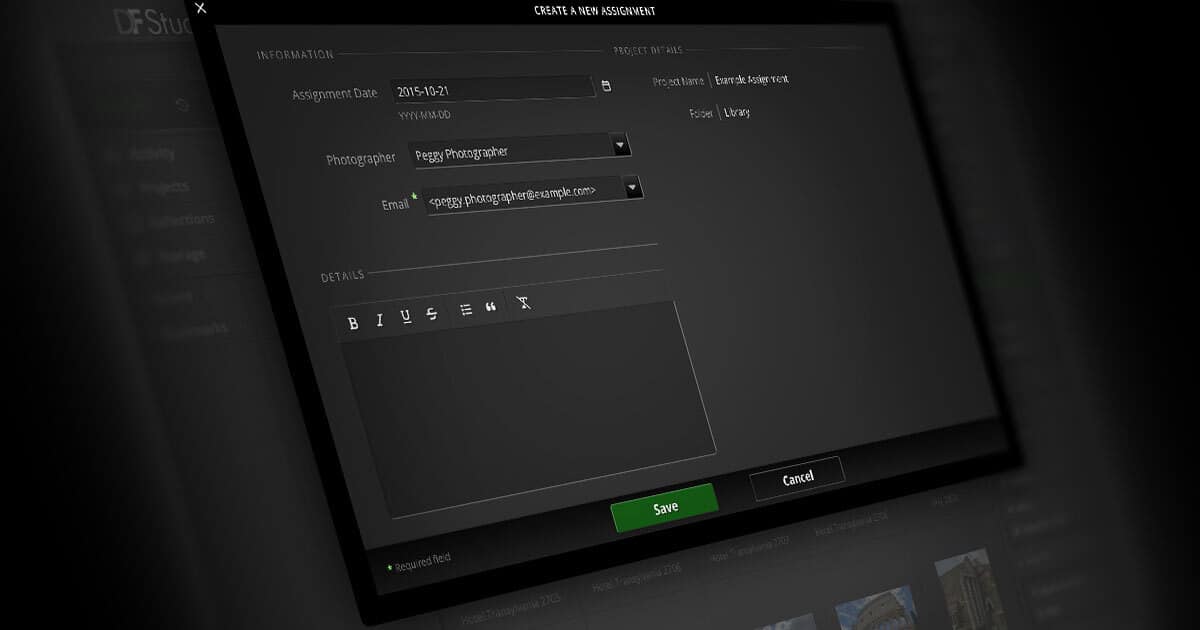
- The “Add Assignment” screen now appears in an overlay, preserving context and making use of a more efficient and user-friendly layout.
Account Management
- Trial accounts now require payment when activating, with subscription fees and all costs discounted during the trial period.
- Apple Pay is accepted for trial account payments, making the signup process quicker than ever.
Asset Workflows & Organization
- Asset filters now work more closely with Find in Project/Collection operations, so the find results are integrated seamlessly into the other filtering options.
- If a proofsheet view is empty due to filtering or find results, a message now clarifies why no assets are shown, and offers a button to clear filters and reveal all assets.
- Active asset filter options are always displayed in the same sequence, across filter panels and the filter bar summary.
- Proofsheet group headers now display a count of assets within each group again.
- Selections and navigation have been retooled throughout Library views for greater performance and reliability.
- Icons, buttons, and Inspector layouts have been refreshed across many contexts, for greater clarity.
Security & Protection
- API Credentials are now automatically disabled after multiple failed authentication attempts in a short period of time.
Bug Fixes
Messengers
- Fixed an issue which blocked users from sending Messengers from Shared Collections that they had created.
- Resolved a defect which could cause certain Messenger errors to display the DF Studio login page instead of an error screen.
- Mitigated an anomaly which resulted in unnecessary scrollbars when addressing a Messenger.
Selects & Approvals
- Corrected a misconfiguration which made it impossible to scroll the Edit menu in cases where the list of Edits was longer than the available space.
Metadata
- Resolved a bug which could cause type-ahead metadata suggestion menus to be displayed without their full list of options.
- Addressed a problem which prevented type-ahead suggestion menus from filtering their options as input was typed into the filter field.
- Patched a fault which prevented converting a Key Person to Named if a pre-defined role existed for that person.
Uploads & Assignments
- Mitigated an anomaly which failed to populate the Photographer field on a Project when adding an Assignment from the Project Inspector.
- Rectified an error which did not foreground the list of issues when opening a DF Studio Upload Report link for an upload operation in which some files failed to transfer.
- Fixed a bug which caused unwanted layout artifacts or menu behavior in the Upload Report interface.
- Corrected a defect which navigated unnecessarily to a Library view after creating a new Assignment.
- Addressed a problem which caused layout misconfigurations when uploading to a Project with a very long name.
Account Management
- Patched a fault which caused errors when attempting to store new billing information.
- Improved the clarity and usability of the trial account signup form and billing information input fields.
- Addressed an anomaly which could cause some buttons in the Contacts overlay to appear broken at specific window sizes.
- Resolved a fault which resulted in a confusing presentation of the groups assigned to a contact.
Asset Workflows & Organization
- Corrected an anomaly which could display the wrong asset when following a link or bookmark directly to an asset in a Project where filtering was active.
- Rectified an additional anomaly which could display the wrong asset when following a link directly to an asset from within the People dashboard preview.
- Addressed an error which could appear when double-clicking to view a Project, Collection, or Library folder from the search results screen.
- Fixed a bug which affected the reliability of the “View Asset” button in the Inspector sidebar of the search results screen.
- Addressed an anomaly which omitted the Existing Setups section of the Move to Setup overlay in some cases where existing Setups were active.
- Resolved a fault which prevented scrolling when viewing a full-sized asset preview in its own web browser window.
- Patched an error which caused asset filters to be restored automatically when deleting an asset or assets.
- Mitigated a defect which could cause Column View to display improperly when navigating with specific keyboard shortcuts.
- Rectified a misconfiguration which displayed the Edit menu while the Arrange feature was active in a Collection, with the potential to interrupt the Arrange behavior by inadvertently navigating to another Edit.
- Corrected an issue which could display an empty Delete Assets overlay in certain circumstances.
- Patched an anomaly which caused unexpected results when conducting a search with a hyphen included in the search text.
- Rectified a problem which resulted in “timeout” failures when deleting large numbers of original files.
- Mitigated a defect which incorrectly required the “Write Metadata” permission in order to use the Export Metadata tool.
- Optimized the performance of proofsheet views by deferring the loading of content in unused Asset Inspector tabs until they are opened.
- Corrected an issue which displayed a download link for a watermarked PDF proofsheet before the file was available.
- Fixed a problem which sometimes caused the selected item in a Library view to be scrolled out of view.
- Addressed an anomaly which could interrupt workflows with unwanted confirmation messages when closing certain overlay panels.
- Rectified a defect which caused the icon for the “2-Up Compare” view to disappear under certain circumstances.
- Patched an issue which caused awkward layout artifacts in situations where the Recent menu in the left sidebar was empty.
Publishing
- Resolved a bug which caused failures when loading the Portfolio access history under the Publish tab.